홀 짝 게임
● pyqt06.ui
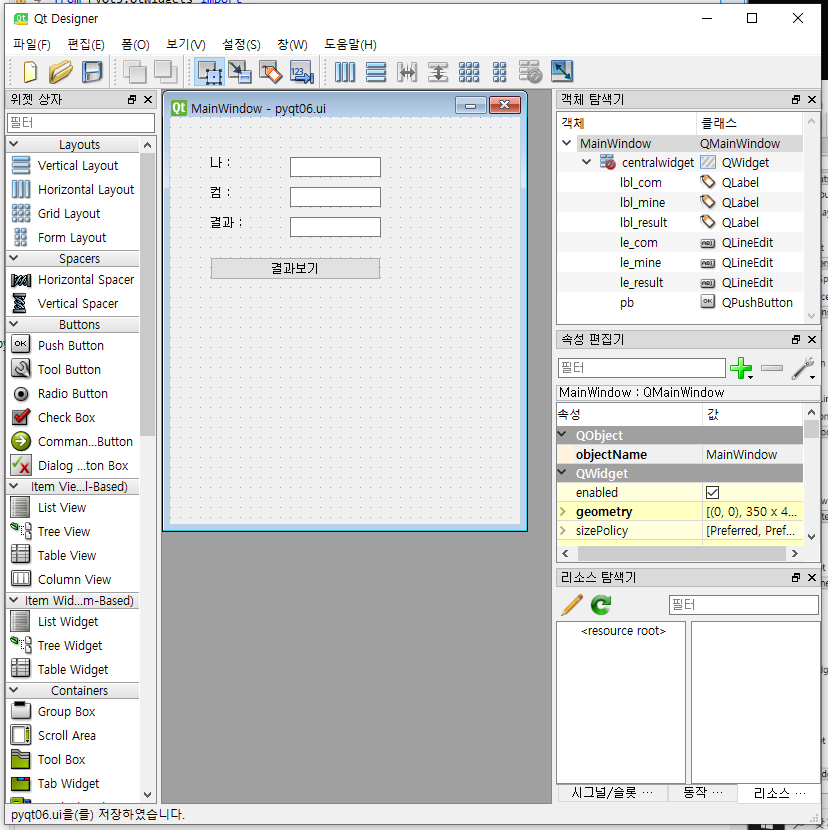
<?xml version="1.0" encoding="UTF-8"?>
<ui version="4.0">
 <class>MainWindow</class>
 <widget class="QMainWindow" name="MainWindow">
  <property name="geometry">
   <rect>
    <x>0</x>
    <y>0</y>
    <width>350</width>
    <height>407</height>
   </rect>
  </property>
  <property name="windowTitle">
   <string>MainWindow</string>
  </property>
  <widget class="QWidget" name="centralwidget">
   <widget class="QLabel" name="lbl_mine">
    <property name="geometry">
     <rect>
      <x>40</x>
      <y>40</y>
      <width>56</width>
      <height>12</height>
     </rect>
    </property>
    <property name="text">
     <string>나 : </string>
    </property>
   </widget>
   <widget class="QLabel" name="lbl_com">
    <property name="geometry">
     <rect>
      <x>40</x>
      <y>70</y>
      <width>56</width>
      <height>12</height>
     </rect>
    </property>
    <property name="text">
     <string>컴 : </string>
    </property>
   </widget>
   <widget class="QLabel" name="lbl_result">
    <property name="geometry">
     <rect>
      <x>40</x>
      <y>100</y>
      <width>56</width>
      <height>12</height>
     </rect>
    </property>
    <property name="text">
     <string>결과 : </string>
    </property>
   </widget>
   <widget class="QLineEdit" name="le_mine">
    <property name="geometry">
     <rect>
      <x>120</x>
      <y>40</y>
      <width>91</width>
      <height>20</height>
     </rect>
    </property>
   </widget>
   <widget class="QLineEdit" name="le_com">
    <property name="geometry">
     <rect>
      <x>120</x>
      <y>70</y>
      <width>91</width>
      <height>20</height>
     </rect>
    </property>
   </widget>
   <widget class="QLineEdit" name="le_result">
    <property name="geometry">
     <rect>
      <x>120</x>
      <y>100</y>
      <width>91</width>
      <height>20</height>
     </rect>
    </property>
   </widget>
   <widget class="QPushButton" name="pb">
    <property name="geometry">
     <rect>
      <x>40</x>
      <y>140</y>
      <width>171</width>
      <height>23</height>
     </rect>
    </property>
    <property name="text">
     <string>결과보기</string>
    </property>
   </widget>
  </widget>
 </widget>
 <resources/>
 <connections/>
</ui>
● pyqt06.ui
import sys
from PyQt5.QtWidgets import *
from PyQt5 import uic
from random import random

form_class = uic.loadUiType("./pyqt06.ui")[0]

class MyWindow(QMainWindow, form_class):
    def __init__(self):
        super().__init__()
        self.setupUi(self)
        self.show()
        self.pb.clicked.connect(self.myclick) # 버튼 클릭 시 myclick 실행됨

    def myclick(self):
        com =""
        mine = self.le_mine.text()
        result =""
         #하나하나 단위 테스트 하면서 짜볼것!
        rnd = random()
        if rnd > 0.5:
            com = "홀"
        else:
            com = "짝"
        self.le_com.setText(com)

        if com == mine:
            result ="승리"
        else:
            result ="패배"
        self.le_result.setText(result)


if __name__ == "__main__":
    app = QApplication(sys.argv)
    myWindow = MyWindow()
    myWindow.show()
    app.exec_()
실행 시 화면 python run !!
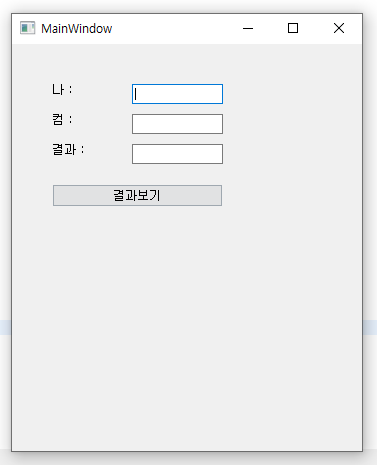
" 나 : " 에 홀이나 짝을 입력하고 결과보기 버튼을 클릭하면
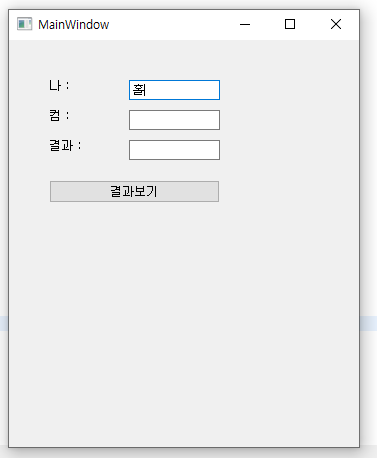
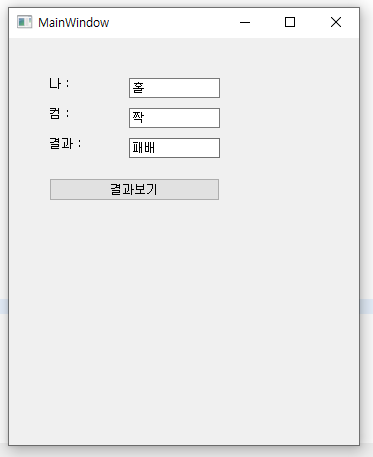
컴퓨터는 홀짝을 랜덤으로 출력하고,
결과는 같을 경우 승리, 다를 경우 패배를 출력한다.
※ 엔터키 눌렀을 때 기능 실행하도록 하는 방법
#LineEdit에서 Return키(Enter키)가 눌렸을 때 기능 실행
self.le_mine.returnPressed.connect(self.myclick)
※ 엔터키 눌렀을 때 기능 실행하도록 하는 방법 + 전체 소스
import sys
from PyQt5.QtWidgets import *
from PyQt5 import uic
from random import random

form_class = uic.loadUiType("./pyqt06.ui")[0]

class MyWindow(QMainWindow, form_class):
    def __init__(self):
        super().__init__()
        self.setupUi(self)
        self.show()
        self.pb.clicked.connect(self.myclick) # 버튼 클릭 시 myclick 실행됨
        self.le_mine.returnPressed.connect(self.myclick) #LineEdit에서 Return키(Enter키)가 눌렸을 때 기능 실행

    def myclick(self):
        mine = self.le_mine.text()
        com = ""
        result = "";
        print(mine, com, result)

        rnd = random()
        if rnd > 0.5:
            com = "홀"
        else:
            com = "짝"
        if com == mine:
            result = "이김"
        else:
            result = "짐"
        self.le_com.setText(com)
        self.le_result.setText(result)


if __name__ == "__main__":
    app = QApplication(sys.argv)
    myWindow = MyWindow()
    myWindow.show()
app.exec_()'대덕인재개발원 > PYTHON' 카테고리의 다른 글
| [PYTHON] 6일차 pyqt / designer 랜덤 숫자 맞추기 게임 (1) | 2024.07.01 |
|---|---|
| [PYTHON] 5일차 과제 pyqt / designer 전화번호 전화기 (1) | 2024.06.28 |
| [PYTHON] 5일차 pyqt / designer 로또 번호 생성하기 (0) | 2024.06.28 |
| [PYTHON] 5일차 pyqt / designer 구구단 출력하기 (0) | 2024.06.28 |
| [PYTHON] 5일차 pyqt / designer 곱셈 계산기 만들기 (0) | 2024.06.28 |


